
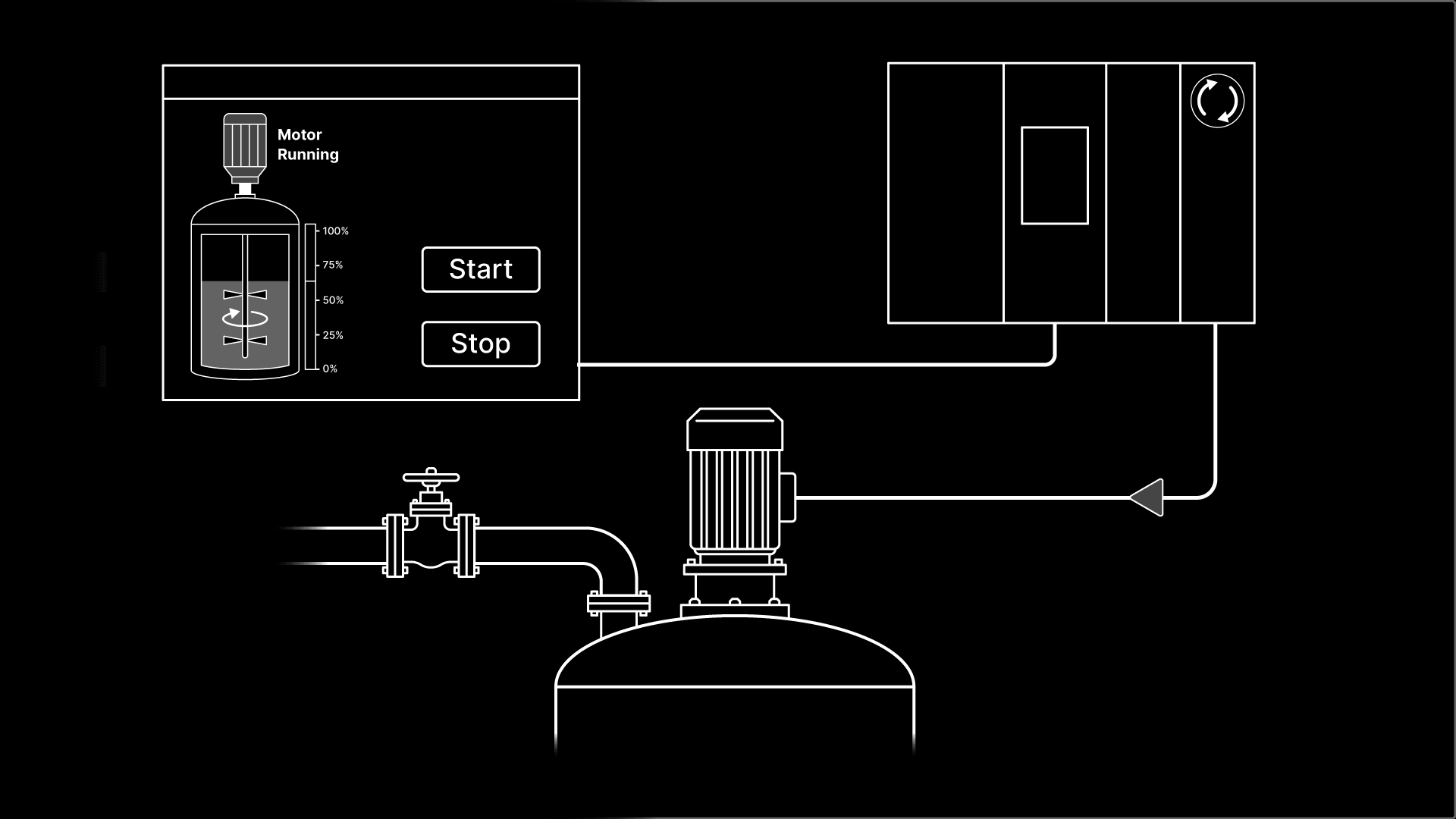
An HMI, or Human Machine Interface, is the screen an operator uses to see what a machine is doing and to tell it what to do next. It lets a person read the state of a process and control it, without touching the controller or the code behind it.
To understand what an HMI does, picture a mixing tank. An operator can select a specific recipe on the HMI to control how the mixing tank behaves without having to modify the PLC code. While the mixing process is running, the operator can use the HMI to understand which step is active and to see any faults that have occurred.
What is an HMI?
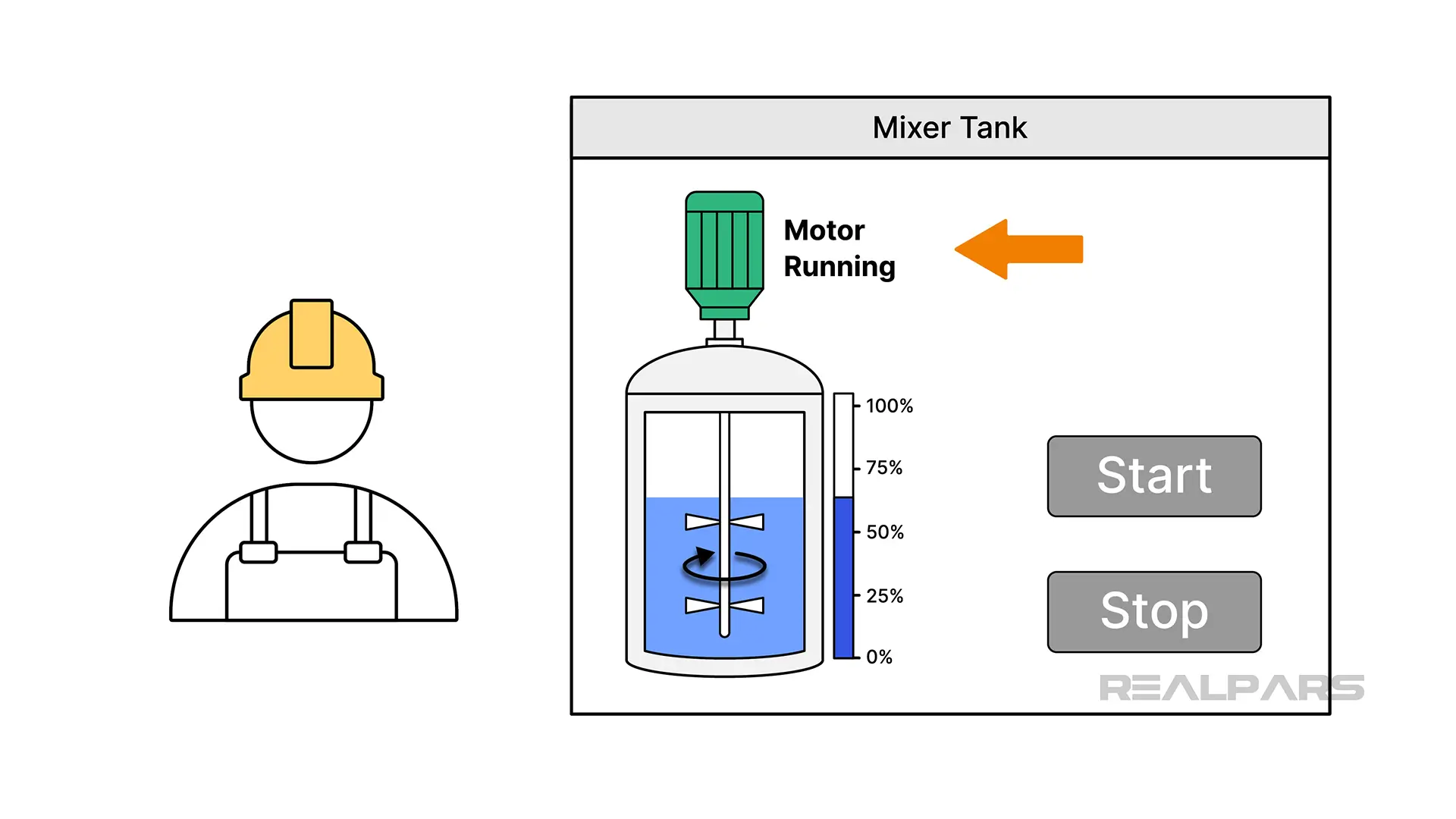
An HMI, or Human Machine Interface, is the operator's window into a machine or process. If you have used a microwave panel, pressing a button to start it and reading the time left on the display, then you have used a user interface. An HMI is the industrial version, built for the plant floor.
An HMI works with a PLC to give a machine or process an interface. The easiest way to remember it is that the PLC decides, and the HMI shows and asks. The PLC contains the control logic and makes decisions while the HMI shows an operator what is happening and allows an operator to send commands to the PLC. In some applications, this means that the HMI is not an essential part of the process, so if the HMI is powered off or damaged, the process can keep running. This is also why replacing an HMI is usually a smaller job than replacing a PLC.
How an HMI talks to a PLC
An HMI communicates with a PLC over an industrial network. Here's what that looks like when an operator starts the mixer on our mixing tank:
- An operator presses a start button on the HMI screen, which is linked to a PLC tag
- The new value is sent to the PLC over an industrial network using a specific communication protocol, like EtherNet/IP
- The value of the tag is updated in the PLC
- The PLC scans the rung where the tag is used
- The logic is executed and the PLC turns on an output
- The output energizes the motor contactor and the motor starts
- An auxiliary contact on the contactor sends a signal back to a PLC input, which turns on the Running tag
- The HMI reads the Running tag and shows the operator that the motor is running
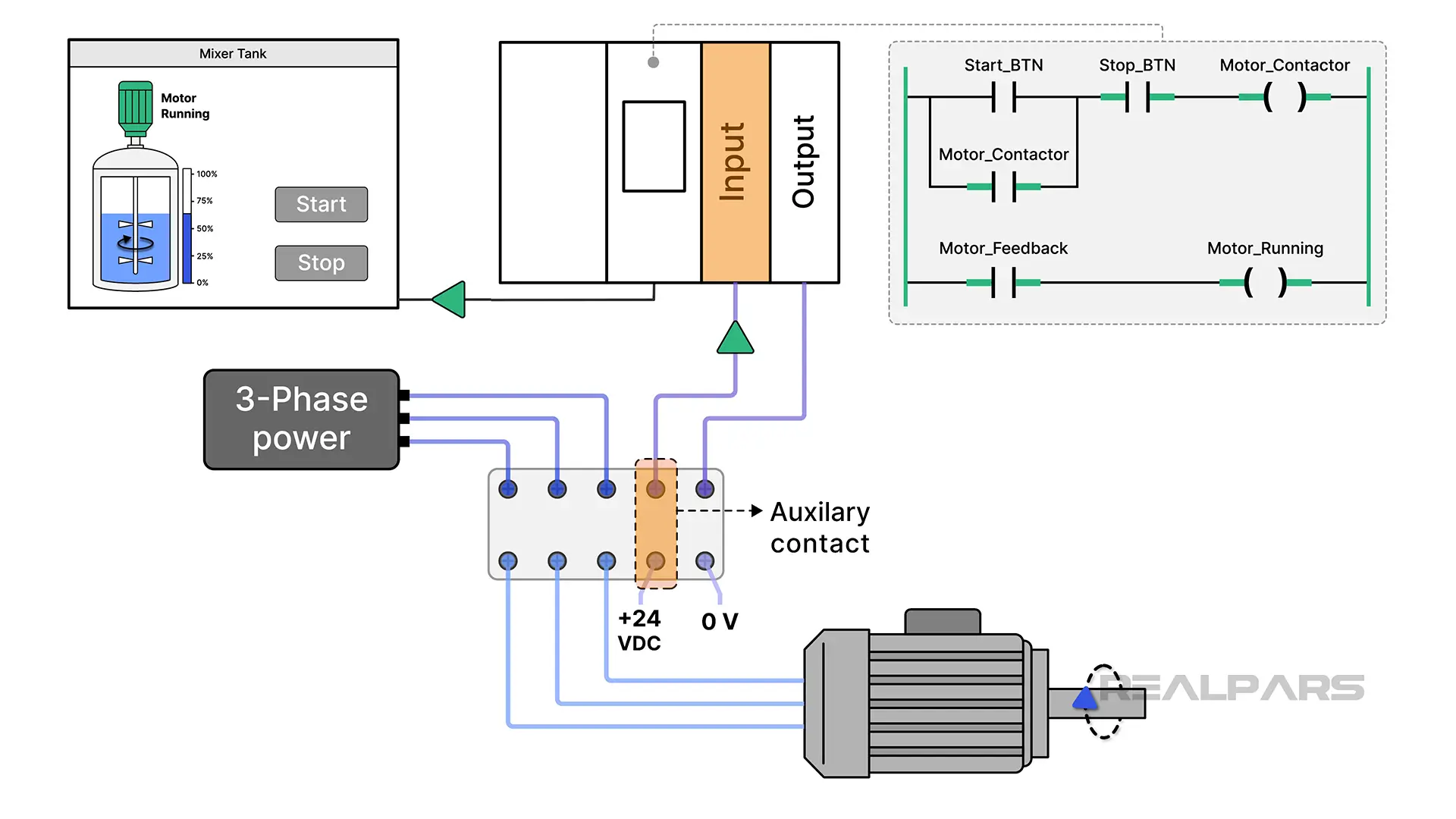
This is why the HMI should show real feedback from the field, not just the result of the logic. If the contactor fails, a screen that only shows the Started tag will tell the operator the motor is running while it is standing still.
Tags and addressing
A tag is a logical name for an area of memory in a device.
If the PLC and HMI are manufactured by the same company, the HMI can generally access the tags directly from the PLC.
If you are dealing with third-party HMIs, you may have to build a mapping between tags in the HMI and tags in the PLC. This can be time-consuming and error prone.
Communication protocols
A communication protocol is the language that is spoken by a device. Common communication protocols in industrial automation are Modbus TCP, EtherNet/IP, and PROFINET.
To establish communication between a PLC and an HMI, both devices have to support and use the same communication protocol. In cases where both devices don't support the same protocols, a physical gateway device can be used to convert from one protocol to another. This matters a lot when you upgrade. Older PLCs often use networks like DH+ or PROFIBUS DP, and many new HMIs may not support them. Checking the protocol before you buy a new HMI can save a lot of time and money, and sometimes it shows that the PLC needs work too.
Update rate
The update rate, or poll rate, is how often the HMI refreshes the values it reads from the PLC.
An HMI doesn't refresh as quickly as logic is executed in a PLC. In general, a PLC will execute its code in a few milliseconds, while an HMI refreshes every 500 milliseconds or so.
Some HMIs have configurable refresh rates, and you may be tempted to set the HMI to refresh as quickly as possible. This is not a good idea because it can create unnecessary congestion on the network and cause the HMI to become unresponsive.
Now that you know how the data moves from a PLC to an HMI and back, let's look at what an HMI actually does.
What an HMI actually does
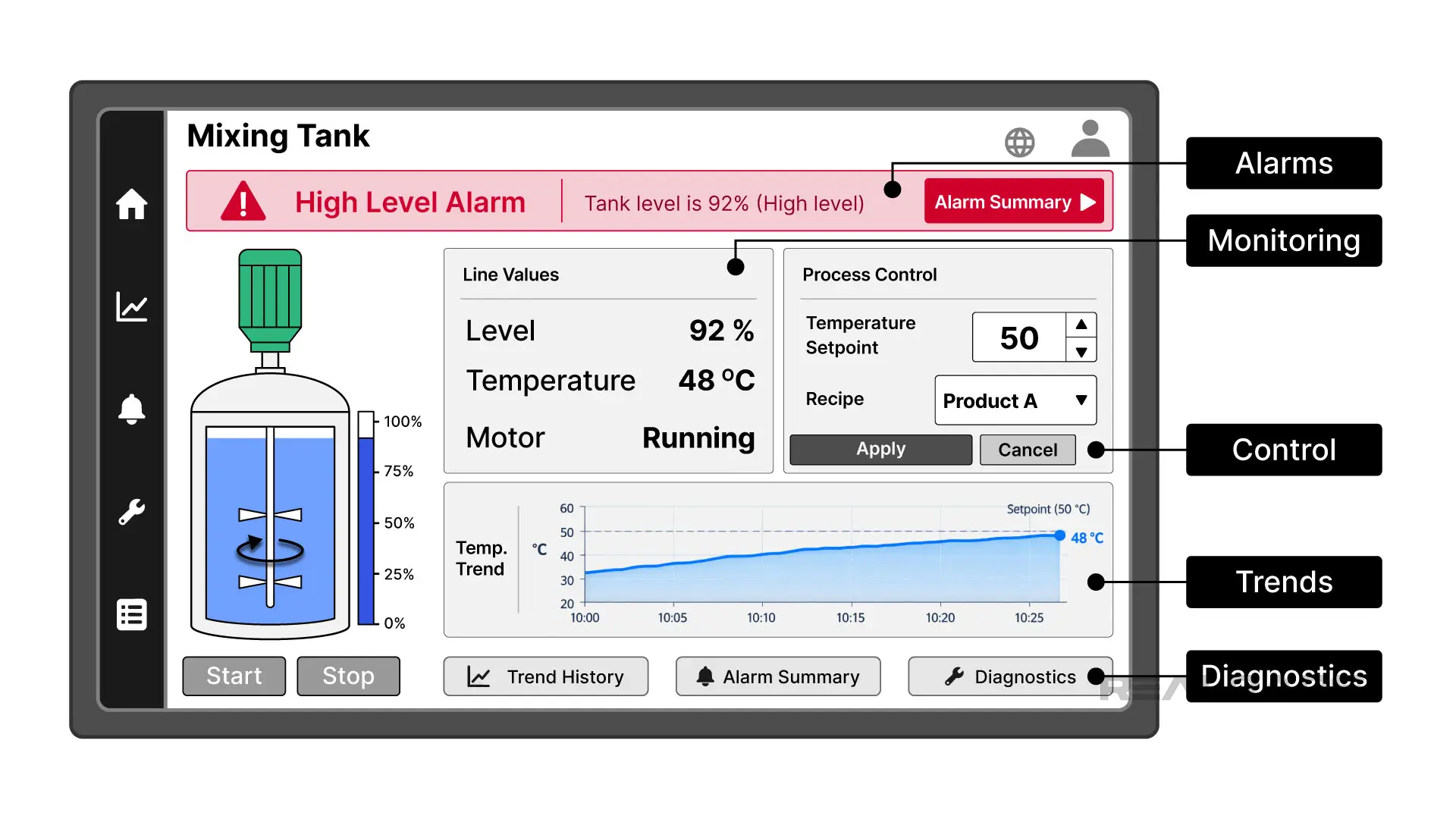
An HMI does five main jobs on the plant floor.
Real-time monitoring.
It shows the live state of the process, so the operator can see a problem forming before it becomes a stoppage.
Process control.
It lets the operator change setpoints and parameters, like switching the recipe in our mixer. This allows companies to produce different products on a single machine without needing to reprogram it every time.
Alarm handling.
It signals abnormal conditions that need action and gathers them in an alarm summary. On our mixing tank, that could be a high level in the tank or a mixer motor that has tripped. Clear alarms tell the operator what went wrong, so fewer problems end up as a call to maintenance.
The ISA-18.2 standard for alarm management says every alarm should need a response from the operator. If an alarm does not need action, it should not be an alarm, because too many alarms train operators to ignore them.
Data logging and trends.
It records values over time and graphs them. A real-time trend reads live from the controller, while a historical trend reads from the stored log. This allows an operator or engineer to analyze process data to understand if it is in control. On our mixing tank, this could be the temperature of every batch, which is useful when a customer asks why one batch came out different.
Troubleshooting.
It can show PLC logic and live tag values on the screen. This means that an engineer doesn't need a laptop or programming software for basic troubleshooting. When a machine is down, that can save a lot of time.
HMIs do more than these five things, including recipe management and switching languages while running, but these are the core functions.
Types of HMI
There are different types of HMIs available for different applications. As the capability of an HMI increases, so does its cost.
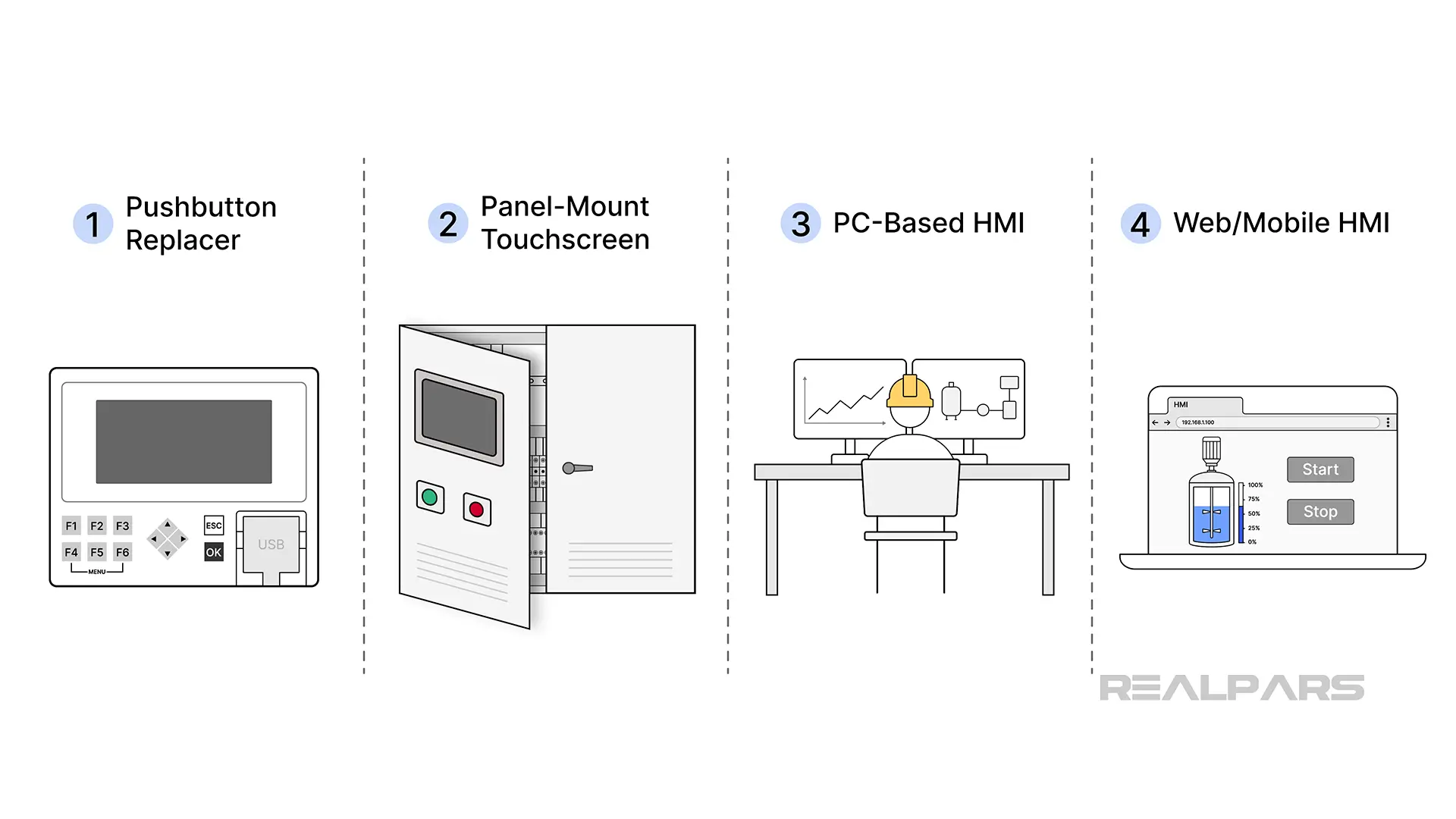
Pushbutton replacer
A small HMI screen, sometimes with a few hard keys, that replaces a panel full of pushbuttons and pilot lights. It is the cheapest type of HMI, and you will see it on a small standalone machine or retrofitted onto an old hard-wired panel. It saves wiring and maintenance of all those separate components. These usually cost a few hundred dollars.
An Allen-Bradley Micro800 Remote LCD unit or a Siemens LOGO! TDE are examplesof a pushbutton replacer.

Panel-mount touchscreen
This is the classic industrial HMI touchscreen that is used for machine-level applications. This type of HMI is typically installed in the door of a control panel and runs an HMI application on a closed operating system. They are designed for industrial automation applications, which means that they work in wide temperature ranges, are built with solid state components, and do not need regular patching.
The cost of these units varies with the size of the display and the capability of the unit. A small budget panel can cost under $1,000, while a large panel from a major brand can cost several thousand dollars.
Rockwell Automation's Optix Panel HMIs and Siemens SIMATIC HMI Unified Comfort Panels are an example of a modern panel-mount touchscreen HMI.

PC-based and thin client
This type of HMI is a software application that runs on an industrial PC, or on a thin client that displays a screen served from a server computer. The cost is generally high, because you are paying for a computer and a license. Expect several thousand dollars for the PC alone, before the software.
This type of HMI is used when you need advanced functionality on a machine-level HMI or for site-level HMIs that monitor and control larger applications.
Examples of PC-based HMIs are an Allen-Bradley ASEM IPC running FactoryTalk View SE, or a Siemens SIMATIC IPC running WinCC Unified PC Runtime.
These are the main types of HMI you will find on the market.
If none of these standard options fit your machine, for example because of the size, the mounting, or a harsh environment, a custom HMI is also an option. RealPars can build a custom HMI for your machine, from the hardware to the screens.
Mobile and web HMI
With a web-based HMI, a server device serves the HMI screens, which are displayed in a web browser on client devices like phones or tablets. The advantage here is that the devices that are used to connect to the HMI are not fixed and can be accessed remotely. The hardware cost can be low, because operators can use phones or tablets the plant already has. Most of the cost is in the software and the server.
Both Rockwell Automation and Siemens support this. A FactoryTalk Optix application or a Siemens WinCC Unified application can be opened in a web browser on a phone or tablet, as well as on the panel or PC it is running on.
Some PLCs, like the CODESYS-compatible Wago CC100 or a Siemens S7-1200, have a built-in web server which lets them act as a server for a web-based HMI that can be connected to by other devices with a browser. This eliminates the need to have a dedicated HMI in a control panel.
If you allow remote access to your HMI, make sure that it is set up securely, following a standard like IEC 62443, because it opens a door into your control system from outside the plant.
HMI vs PLC vs SCADA vs DCS
The most common confusion when it comes to HMIs is how an HMI relates to a PLC, SCADA, and a DCS. The table below provides a summary of the similarities and differences between these systems.
PLC. The PLC, or Programmable Logic Controller, holds the logic and drives the outputs for machine or process control. It makes the decisions, and the HMI shows what it is doing.
HMI. An HMI is used to display the status of a process and allow an operator to interact with a machine or process. In general, a machine-level HMI interacts with one machine or process skid.
SCADA. SCADA, or Supervisory Control and Data Acquisition, is the site-level HMI that supervises many machines or many sites. The HMI in a control room is what most people call SCADA.
DCS. A DCS, or Distributed Control System, is one integrated system for a large, continuous plant, with control distributed across it. Unlike an HMI, it holds control logic. For the full comparison, read our DCS vs SCADA article.
HMI software, the real options
There are many different companies that manufacture HMIs and sell programming software for HMIs. The list below covers the most popular HMIs and their programming software.
Siemens WinCC and WinCC Unified are used to program Siemens Comfort and Unified panels and PC-based systems. The development software is paid, in the mid to high tier.
Rockwell FactoryTalk View ME and SE are used to program Allen-Bradley PanelView Plus panels with View ME, and PC-based site systems with View SE. Paid, in the mid to high tier.
Rockwell FactoryTalk Optix is Rockwell's newer, flexible platform. Optix Studio is free to download and runs on Optix panels, PCs, and more.
CODESYS is vendor-neutral, and its development environment is free. It includes CODESYS Visualization, which lets you build HMI screens in the same software that you use to program the PLC. The screens can run on a panel or in a web browser, on PLCs from many brands that use CODESYS, like Wago.
Ignition Perspective, from Inductive Automation, is a web and mobile-first HMI and SCADA platform. The Designer is free to develop in, and you license the server. The cost is mid to high tier.
AutomationDirect C-more and Weintek EasyBuilder are budget options. They drive low-cost panels, with free development software, and relatively cheap hardware.
When it comes to selection, I generally advise not to select an HMI based on price only.
A lot of the work when it comes to developing HMI applications is related to integrating the PLC and the HMI together. It is generally easier to integrate an HMI and a PLC from the same brand, like an Allen-Bradley HMI with an Allen-Bradley PLC, or a Siemens HMI with a Siemens PLC. It also means that you have one company to call for support. The downside is that you are tied to one brand's prices and licenses, which can make future changes more expensive.
Where HMIs are used
HMIs turn up anywhere a person needs to see and control a process.
Manufacturing and packaging lines
The HMI handles start and stop, alarms, and statistics. On a packaging line, each machine often has its own HMI, for example the filler, the capper and the labeler. The operator uses it to change products, adjust speeds and settings, and see why the line stopped. Many lines also show production counts and downtime on the HMI, so the shift supervisor can see how the line is running.
Water and wastewater
Usually a site-level, SCADA-style HMI in a control room, watching pumps, tanks, and flow across a plant or remote sites that can be miles apart. Operators use it to check pump status, tank levels and alarms at remote pump stations, without driving out to each site.
Food and beverage
Similar to packaging lines, but recipes are also selected on the HMI and data logging may be important for traceability and audits.
Building and HVAC
HMIs supervise chillers, boilers, and air handling units. There are fewer fast-moving values here and more of an emphasis on trending to verify that the process is controlled over time.
What an HMI costs
When you are purchasing an HMI, the hardware is not the only cost. In many projects, it is not even the biggest cost. Most of the money goes into the engineering hours to build and test the screens. When it comes to Total Cost of Ownership, there are four aspects to consider:
The Hardware
This is typically priced by screen size and you may pay a premium for a well known brand like Allen Bradley or Siemens.
The Software
Most HMIs need paid development software to program. The license may be a one-time cost or an ongoing subscription.
If it is a PC-based HMI, you will also need runtime software to run the application.
The Hours
Mapping tags, building screens, and testing applications is a time-consuming process. A typical machine-level HMI application may have 20 to 50 displays, 50 to 200 alarm messages, and 100 data-log elements.
Each of these components has to be built and tested, which takes time.
The Support
The final cost is support. That may be an internal cost related to scheduled maintenance or an external cost in the form of a service contract with a system integrator or manufacturer.
Signs your HMI needs replacing or updating
So how do you know if your HMI needs replacing?
Ask yourself the following questions, and if you get two or more nos, it might be time to consider upgrading.
- Is the HMI model supported by the manufacturer?
- Does the development software run on a current version of Windows?
- Is there a manageable number of alarms being displayed?
- Do you have spare hardware available on the shelf?
- Do the screens match the process?
- Is there still someone on your team who knows how the HMI application and its tags are set up?
- Do you have a recent backup of the HMI application?
If you answered no to two or more questions, then you are carrying risk that can lead to unplanned downtime.
What an HMI upgrade actually involves
In my experience, an HMI upgrade project has the following steps:
- Audit the existing screens and tag list to find out what's really there.
- Confirm the PLC's protocol and whether the controller needs updates to talk to the new HMI.
- Rebuild the screens. I recommend rebuilding rather than copying, because a copy carries the old problems forward. An upgrade is also a good time to follow ISA-101, the standard for HMI design. In practice, this means calm screens and colors used only to show problems, so operators can see what is wrong at a glance.
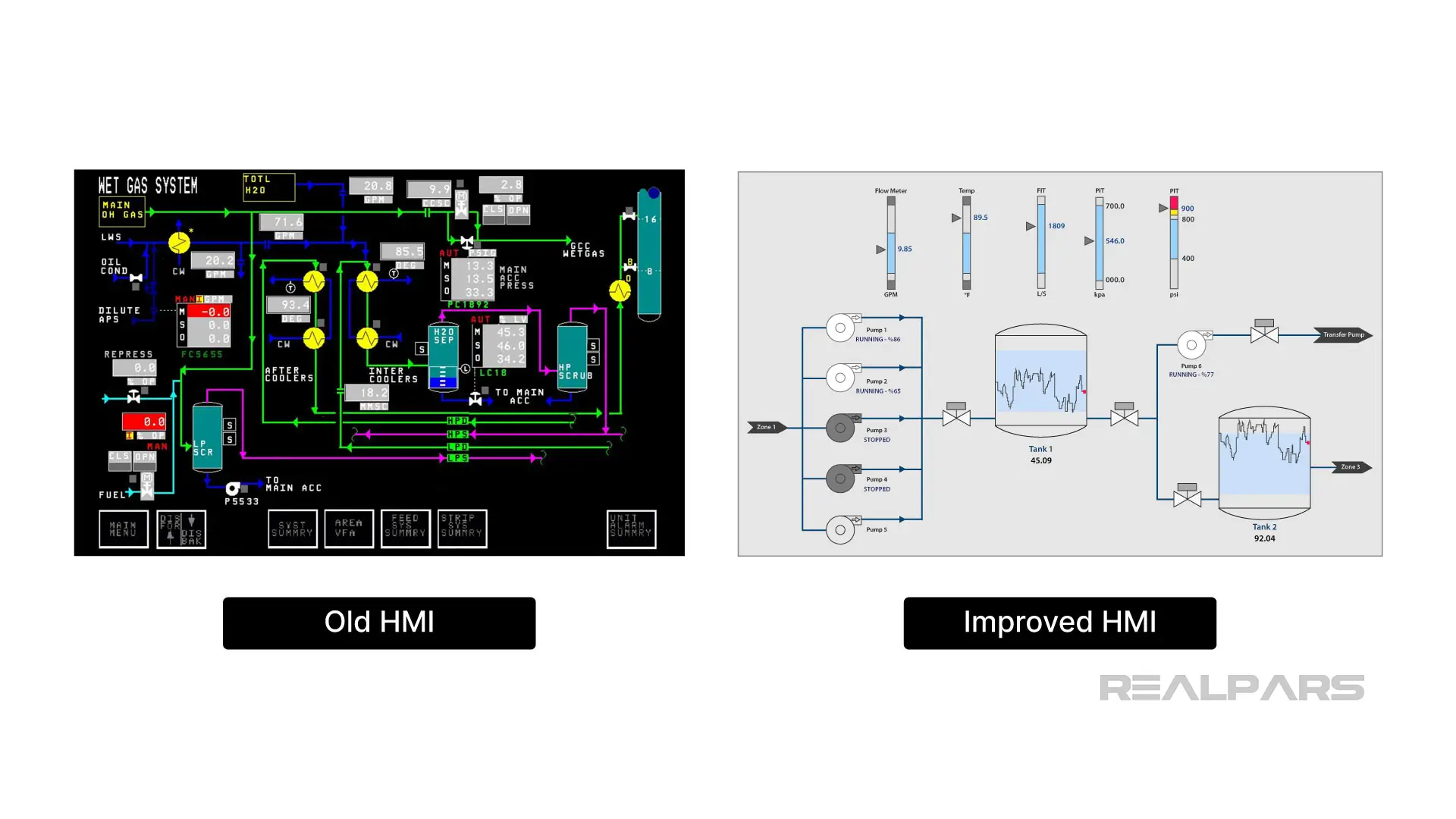
- Benchtop test of updated HMI application.
- Test against the live PLC.
- Train operators on the new HMI.
- Cutover to the new HMI.
This cutover to the new HMI can be one of the hardest parts of the process because it is often the first time that an operator will interact with the new HMI in a production environment. On one project that I worked on, we had to do a last minute modification to a HMI project when we realized that some of the buttons were too small to be pressed easily by gloved hands. That was an issue that we missed when we were testing the HMI in an office.
For small HMI upgrades, a plant with a solid engineering or maintenance team can carry out the work themselves. For larger, more complex jobs, I always recommend working with experts to minimize risk.
If you are planning an HMI upgrade or need a new HMI designed for a machine or process, RealPars can help. We can look at your current setup and tell you honestly what needs to be done and what your own team can handle. Get a second opinion on your HMI upgrade plan.

